
Introduction
Broken affiliate links can waste 10-25% of your campaign spend by sending paid traffic to dead pages, expired offers, or wrong landing pages. An affiliate link tester with GEO and device simulation catches these problems before your budget disappears. Regular testing across countries and devices is the only reliable way to prevent silent revenue loss.
Broken affiliate links do not show up in fraud reports. They do not trigger alerts. They just silently eat your spend while your team optimizes campaigns based on data that no longer reflects reality. According to industry data, 18% of affiliate traffic gets flagged as invalid, and a significant chunk of that is not fraud at all. It is broken tracking, expired offers, and redirect failures.
The affiliate marketing industry will surpass $17 billion in global spend by 2026. Even a small percentage going to dead links adds up fast.
Why Broken Affiliate Links Drain Your Budget
When an affiliate link breaks, the money keeps flowing. Your campaigns keep running. Your partners keep sending traffic. Clicks keep getting billed. The only thing that stops is conversions.
The problem compounds over time. A broken link on a high-spend offer can burn through thousands of dollars before anyone notices. Affiliate networks forwarding billions of clicks per month cannot manually check every offer. Advertisers often do not find out until they see conversion rates drop in a weekly report, days after the damage started.
The direct cost is wasted ad spend. But the indirect costs hit harder. Your optimization algorithms start making bad decisions based on skewed data. You might pause a partner who was actually performing well because their traffic landed on a 404 page for three days. Or you scale spend on an offer that looks clean, when in reality it has no conversions at all because the landing page changed.
Affiliate fraud costs businesses over $3.5 billion annually. Broken links do not get their own line item in those reports, but they should.
Five Ways Affiliate Links Break
Expired Offers That Still Receive Traffic
An advertiser pauses an offer or hits a daily cap. The tracking link stays live, but the landing page now shows an error, a generic homepage, or a “this offer is no longer available” message. Affiliates keep sending traffic because nobody told them to stop, and the tracking platform still accepts clicks.
This is the most common cause of broken affiliate links, especially for CPA networks running hundreds of offers at once.
GEO-Specific Redirect Failures
An offer works perfectly when you test it from your office in New York. But your affiliates send traffic from Germany, Brazil, and Indonesia. The advertiser’s redirect logic blocks certain countries, serves different landing pages, or routes to a localized version that no longer exists.
You will never catch this with a VPN and a browser tab. A VPN gives you a data center IP, and advertisers can easily identify and whitelist those. The only way to find GEO-specific failures is to test from actual residential IPs in the target country.
Device and Deeplink Mismatches
A CPI offer routes iOS users to the App Store and Android users to Google Play. Then the advertiser updates their redirect logic and iOS 17+ users get stuck in a redirect loop. Or the deeplink scheme changes and the tracking link lands on a blank Safari page instead of the app listing.
Mobile deeplink failures are especially hard to diagnose because they are invisible from a desktop. Your analytics just show a drop in installs with no obvious cause.
Redirect Chain Rot
Every affiliate tracking link goes through a chain of redirects. Click tracker to network to advertiser to landing page. Sometimes four or five hops. Over time, these chains break down. An intermediary tracker goes offline. A redirect times out. A 302 gets changed to a 301, and the whole chain sends users to the wrong destination.
Each additional hop also adds latency. Research consistently shows that every extra second of load time kills conversion rates. A redirect chain with six hops and a combined 4-second delay is losing you money even when it technically “works.”
Advertiser-Side Changes Without Notification
Advertisers change landing pages, update tracking parameters, swap attribution providers, or restructure their URL scheme. They rarely notify every affiliate network running their offers. One day the link works. The next day it 302s to a completely different page, or the conversion pixel fires on a page that users never reach.
This happens more often than most people realize, and it is nearly impossible to detect without automated affiliate link monitoring that regularly checks your entire offer catalog.
How to Calculate What Broken Links Cost You
The formula is simple:
Daily spend on offer x percentage of links broken x number of days undetected = wasted spend
Say you spend $500/day on an offer. The link breaks for a specific GEO that represents 30% of your traffic. It takes 5 days to notice because your weekly reporting cycle has not flagged it yet.
$500 x 0.30 x 5 = $750 wasted. On a single offer.
Now multiply that across a network running 200+ active offers. If even 5% have some form of link issue at any given time, you are looking at serious budget leakage every month.
That formula only captures direct spend. It does not account for:
Damaged partner relationships. An affiliate sending quality traffic to your broken link will eventually stop working with you. Rebuilding that trust costs more than the lost clicks.
Skewed analytics. Every broken link pollutes your data. Conversion rates drop, but not because of traffic quality. You end up making optimization decisions based on bad numbers.
Missed revenue. With average affiliate ROI sitting at 12:1 return on ad spend, every dollar wasted on a dead link is $12 in lost potential revenue.
How to Test Affiliate Links the Right Way
Manual Testing Does Not Scale
The traditional approach: open an incognito window, fire up a VPN, click the link, see where it goes. This works if you have 5 offers. It does not work if you have 500.
Manual testing misses GEO-specific issues (your VPN gives you a data center IP, not a residential one), device-specific failures (you are testing on desktop), and intermittent problems (the link worked at 2 PM but broke at 6 PM when the daily cap hit).
What a Good Affiliate Link Tester Actually Does
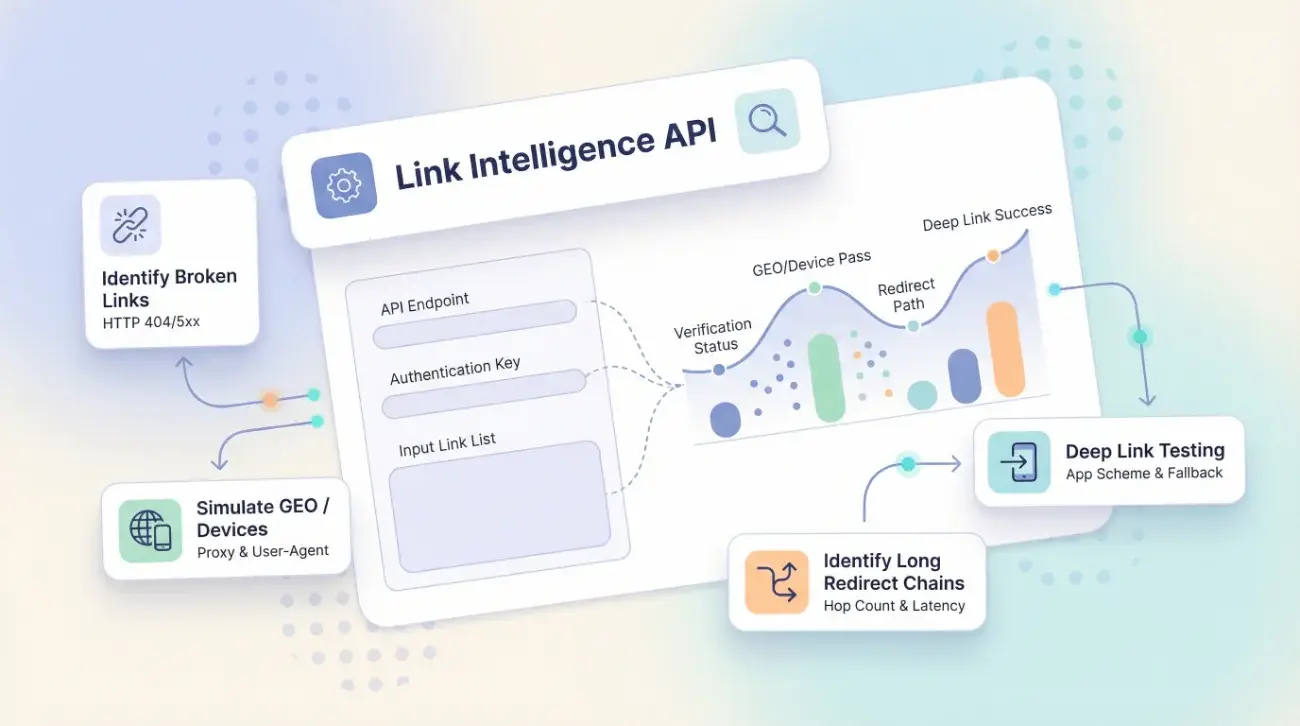
An effective affiliate link checker needs to do more than ping a URL and check for a 200 response. It should:
Test from real residential IPs in the target country, not data center IPs that advertisers can easily whitelist.
Simulate actual devices including iPhone, Android, and Desktop with proper user agents and screen resolutions.
Show the full redirect chain from first click to final landing page, including every intermediate hop, response code, and redirect type.
Compare the final destination against the expected landing page to catch silent redirects.
Run automatically via API so you can test hundreds of offers on a schedule without manual effort.
If your current process involves someone on your team clicking links one by one in a browser, you are guaranteed to miss problems.
How to Build an Affiliate Link Testing Process
Knowing that links break is one thing. Building a process that catches problems before they cost you money is another.
Test high-spend offers daily. Any offer where you spend more than $200/day should be tested at least once every 24 hours, from every GEO you are targeting.
Test everything else weekly. Lower-spend offers still need regular checks. A weekly sweep of your full offer catalog catches the slow-burn problems like redirect chain rot and expired landing pages.
Automate with API access. Manual spot-checking is a starting point, not a strategy. Connect your affiliate link tester to your tracking platform via API. Set up automated tests that run on a schedule and alert your team when something fails.
Define clear escalation rules. When a test fails, what happens? Who gets notified? Does the offer auto-pause, or does someone need to manually review it? The faster you react, the less money you waste.
Track results over time. Keep a log of how many broken links you find per week. This data helps you identify patterns, such as certain advertisers that break links more often or specific GEOs that cause problems, and builds the case for investing in better QA processes.